Explore the Sun in 3D and Compare Solar Observations
The Sun looks different through different instruments. Live Sun flies to the Sun and applies recent NASA SDO imagery to the 3D globe. Open the Sun’s details to switch image channels and inspect the evidence behind the view. The close-range magnetic field is a reconstruction constrained by observations, not a direct photograph of field lines.
Open recent solar observations →Free in your browser · No account required · 3D view uses WebGL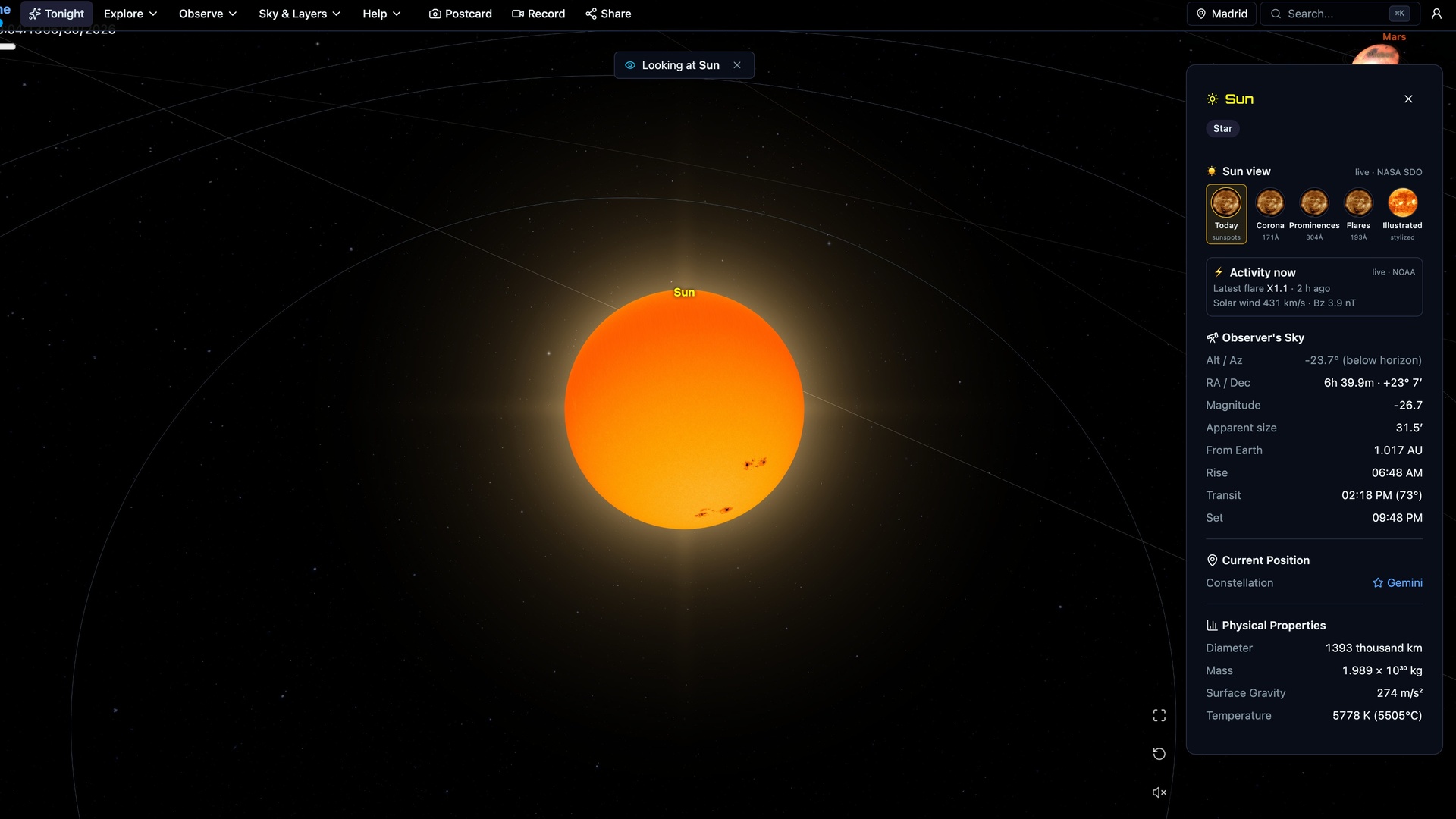
Try it in the app
- Open Live Sun to fly to the Sun with SDO imagery enabled. Open the Sun’s details and inspect the source and any available observation timestamp.
- Use the Sun view controls to compare Today, Corona, Prominences and Flares. The labels identify different instrument bands, not equivalent visible-light photographs.
- Choose Illustrated to compare the stylized surface. Inspect the evidence before treating a rendered magnetic field or a saved image as a current observation.
On a phone, drag to change the view and pinch to zoom. If the 3D view cannot load on your device, the guide and its source links remain available here.
What a solar image shows
An instrument measures light in particular wavelength bands. A visible-light image and an extreme-ultraviolet image emphasize different solar structures. NASA’s Solar Dynamics Observatory studies the Sun using several instruments; its observations are not interchangeable pictures of a single visible surface.
Why the colors change
Many solar images assign visible colors to wavelengths our eyes cannot see. A bright region in one channel need not look equally bright in another. Compare the instrument and channel labels before drawing conclusions about temperature, magnetic activity or a feature’s shape. Display color alone is not a calibrated physical measurement.
What the lines around the Sun mean
The close magnetic corona uses a potential-field source-surface (PFSS) reconstruction constrained by NASA HMI magnetic observations. The curves are modeled field lines, not photographed loops, particle tracks or a current flare forecast. Source maps and model dates are shown in the evidence. The model cannot establish the full time-dependent magnetic structure.
Recent does not mean instantaneous
Solar images are published every half hour, and the magnetic reconstruction is checked every six hours. The image source can provide HTTP Last-Modified metadata without a decoded exposure timestamp; publication, retrieval, model date and observation time are distinct. Space Time displays that context rather than treating a saved image as continuous live video. If a current observation is missing, its absence is not evidence that the Sun is quiet.
A safe place to explore solar geometry
The simulation lets you move around the Sun and inspect the solar system without looking at the real Sun. For any real solar observing, use appropriate certified solar-viewing equipment and follow the equipment maker’s instructions. Never point an unfiltered telescope or binoculars at the Sun.
Sources and evidence
Guide by Point Dynamics. Reviewed 2026-10-06. Saved scene images illustrate the experience; they are not current observations.